What Does a Hard Drive Do? HDD vs SSD Data Storage Explained

Key Takeaways...
- A hard drive stores the operating system, software, and personal files in a computer system.
- HDDs use spinning platters and mechanical moving parts to store and retrieve data.
- SSDs use flash memory, which provides faster performance and improved reliability.gineers and large-scale production efficiency.
- The read-write heads and actuator arm in HDDs are responsible for accessing data on the magnetic disk.
- Hard drives are essential for saving data permanently and ensuring the computer functions properly.
- Choosing between HDD and SSD depends on whether you need larger storage capacity or high-speed performance.
What Does a Hard Drive Do in a Computer?
A hard drive is the primary data storage device in a computer responsible for storing and retrieving digital information. This includes the operating system, software applications, documents, photos, videos, and system files.
A hard drive ensures that your data remains saved even when the computer is turned off, making it an essential part of any computing system.
There are two main types of storage devices:
- HDD (Hard Disk Drive) — traditional mechanical storage
- SSD (Solid-State Drive) — modern flash-based storage
Both serve the same purpose but operate in very different ways.
Understanding what does a hard drive do is essential because it is the main data storage device that allows a computer to function properly. A hard drive stores and retrieves data such as the operating system, software, documents, images, and videos. It ensures that all information remains saved even when the computer is powered off.
Every action you take on a computer depends on this system because it continuously stores and retrieves data in the background. Without a hard drive, a computer cannot operate since there would be no place where data is stored.
How a Hard Drive Stores and Retrieves Data
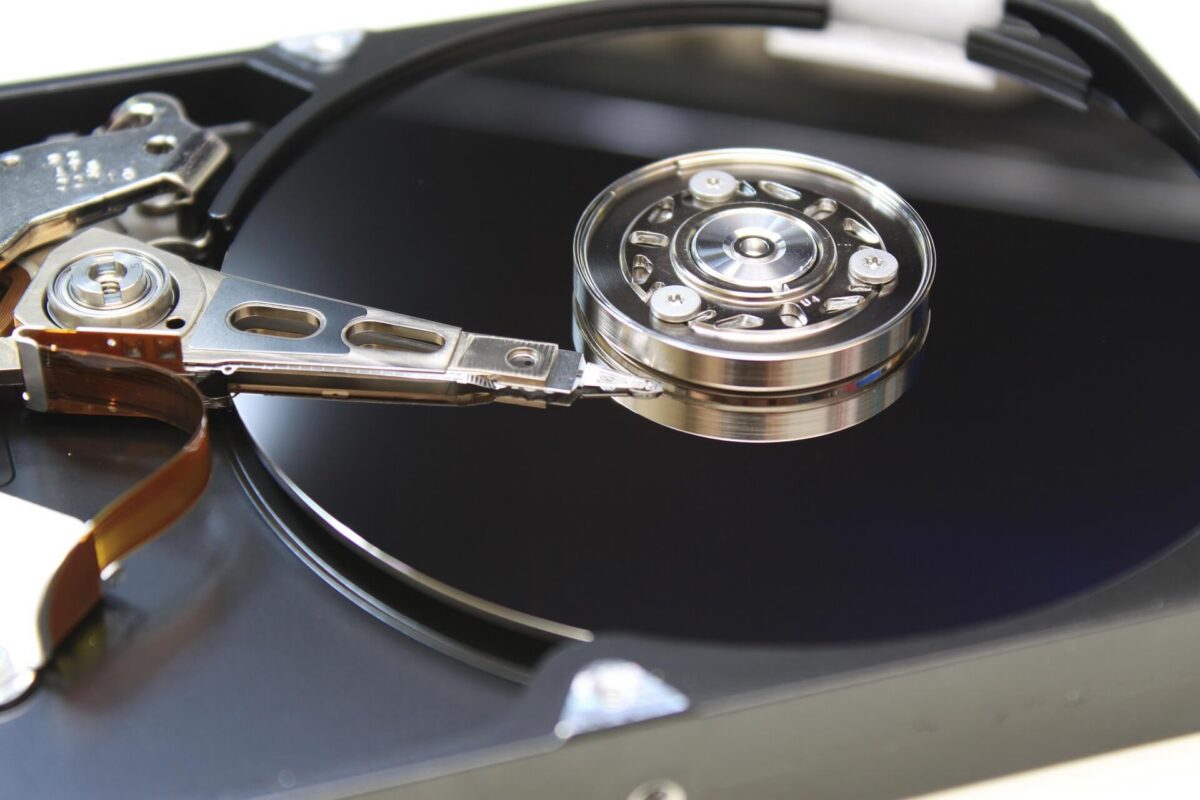
A hard drive works by storing information on spinning platters, which are circular disks coated with a magnetic disk layer. These platters hold all digital information in magnetic form.
To access this information, read-write heads move across the platters using an actuator arm. This process allows the system to store and retrieve data quickly and accurately.
Inside a traditional disk drive HDD, the moving parts physically locate data, which makes the process reliable but slower compared to modern storage systems.
HDD Storage Process
An HDD stores data on spinning platters coated with magnetic material. A moving component called the actuator arm positions read/write heads over the correct area to access data.
When you open a file, the drive:
- Locates the data on the platter
- Moves the read/write head into position
- Reads the magnetic information
- Sends it to the computer
This mechanical process makes HDDs reliable but slower.
SSD Storage Process
An SSD uses flash memory chips instead of moving parts. Data is stored electronically, allowing almost instant access.
This results in:
- Faster boot times
- Quicker file loading
- Improved system responsiveness
HDD vs SSD: How They Work Differently
This hdd vs ssd data storage comparison highlights how each technology stores information and affects performance in everyday computing.
A disk drive HDD uses mechanical moving parts, including spinning platters, a magnetic disk surface, and read write heads. Because of these moving parts, HDDs are suitable for larger storage capacity but have slower performance when retrieving data.
In contrast, solid state drives SSDs use flash memory, which has no moving parts. This allows high speed performance, faster boot times, and quicker access to the operating system and files.
SSDs are more efficient for loading a large file, running applications, and improving overall system responsiveness because data is stored electronically rather than mechanically.
Hard Disk Drive (HDD)
- Uses spinning platters and mechanical parts
- Lower cost per GB
- Larger storage capacity
- Slower data access speed
- More vulnerable to physical damage
Solid-State Drive (SSD)
- Uses flash memory technology
- No moving parts
- Much faster performance
- Higher reliability and durability
- More expensive per GB
In simple terms:
HDD = storage capacity
SSD = speed and performance
Why Hard Drives Are Important
A hard drive is essential because it acts as the main storage system for all computer data. It ensures the operating system runs properly and allows users to save, open, and manage files.
Every application depends on storage to function correctly. Without a hard drive, no data would be stored permanently, and the system would not be usable.
Hard drives are responsible for:
- Running the operating system
- Launching applications
- Storing user files
- Managing long-term data storage
Whether HDD or SSD, both technologies are critical for everyday computing.
How Hard Drives Physically Work
Inside a disk drive HDD, spinning platters rotate at high speed while the actuator arm positions the read write heads over the correct location on the magnetic disk. This allows precise reading and writing of data.
Modern HDDs also use perpendicular recording, which increases storage efficiency by allowing more data to be stored vertically on the platters. This improves larger storage capacity without increasing physical size.
HDD vs SSD Key Differences
HDDs rely on spinning platters and mechanical movement, while SSDs use flash memory. This makes HDDs better for cost-effective larger storage capacity, while SSDs provide high speed performance and faster retrieving data.
Both technologies serve the same purpose, which is to store and retrieve data, but they differ in speed, durability, and efficiency.
How Hard Drives Work Physically (HDD Explained)
Inside an HDD, several components work together:
- Spinning magnetic platters
- Read/write heads
- Actuator arm
- Spindle motor
The platters rotate at high speed while the actuator arm moves the heads precisely across the disk to read or write data.
Modern improvements such as perpendicular magnetic recording (PMR) have significantly increased storage density, allowing more data to be stored in smaller physical spaces.
HDD vs SSD: Which One Should You Choose?
Choosing between HDD and SSD (the classic hdd vs ssd decision) depends on your needs:
Choose HDD if you need:
- Large storage capacity
- Lower cost solution
- Archiving files and backups
Choose SSD if you need:
- Faster performance
- Quick boot times
- Better gaming or editing experience
- High reliability
Many modern computers now use a hybrid approach (SSD + HDD) for both speed and storage.
A hard drive is a data storage device that stores and retrieves digital information required for computer operation. HDDs use mechanical spinning platters, while SSDs use flash memory for faster performance.
Understanding the difference helps you choose the right storage device based on whether you prioritise speed, cost, or storage capacity.
Frequently Asked Questions (FAQ)
What is the main function of a hard drive?
A hard drive stores and retrieves all digital data on a computer, including the operating system and files.
Is SSD better than HDD?
SSDs are faster and more reliable, while HDDs offer larger storage at a lower cost for data storage needs.
Can a computer work without a hard drive?
No. A computer needs a storage device to run an operating system and store data.
What lasts longer, HDD or SSD?
SSDs generally last longer due to no moving parts, while HDDs are more prone to mechanical failure.